Sprite-Ordering-and-Camera-Culling
Project maintained by paupedra Hosted on GitHub Pages — Theme by mattgraham
Camera Culling
In rendering, camera culling is a way of optimizing our Draw calls so that only things visible inside the camera view are drawn. This is very import for any kind of video game so here is a list of reasons why you should care about culling:
- There will be a bigger limit to the size of the map/levels in the game
- There will be more processing power to be spent on gameplay
- Game will run smoothly in machines with less resources
- Highest resolution and LOD (Level Of Detail) will be more easily achieved
- It’s optimal!
Now that you see why you would be interested in having culling in your game let’s go through some of the types of culling.
1. Frustum Culling:
This refers to the process of discarding any object completely outside the view of the camera. It effects performance dramatically and it’s mandatory for almost any kind of game. It is applicable to both 2D and 3D graphics.
In 3D:
In 3D the usual approach involves creating two planes between the closest and furthest plane view of the camera, his creates the shape of a truncated pyramid representing the area which will be viewed by the camera, the camera being the tip and the further plane the base. Then we should check for intersections between these two planes and the objects in the scene and discard the ones which are completely outside the view.
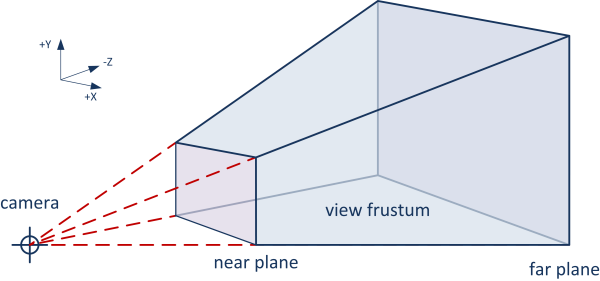
Image found here portraying the two planes and the area which should be rendered. Also here’s a very good video briefly explaining how it is calculated:
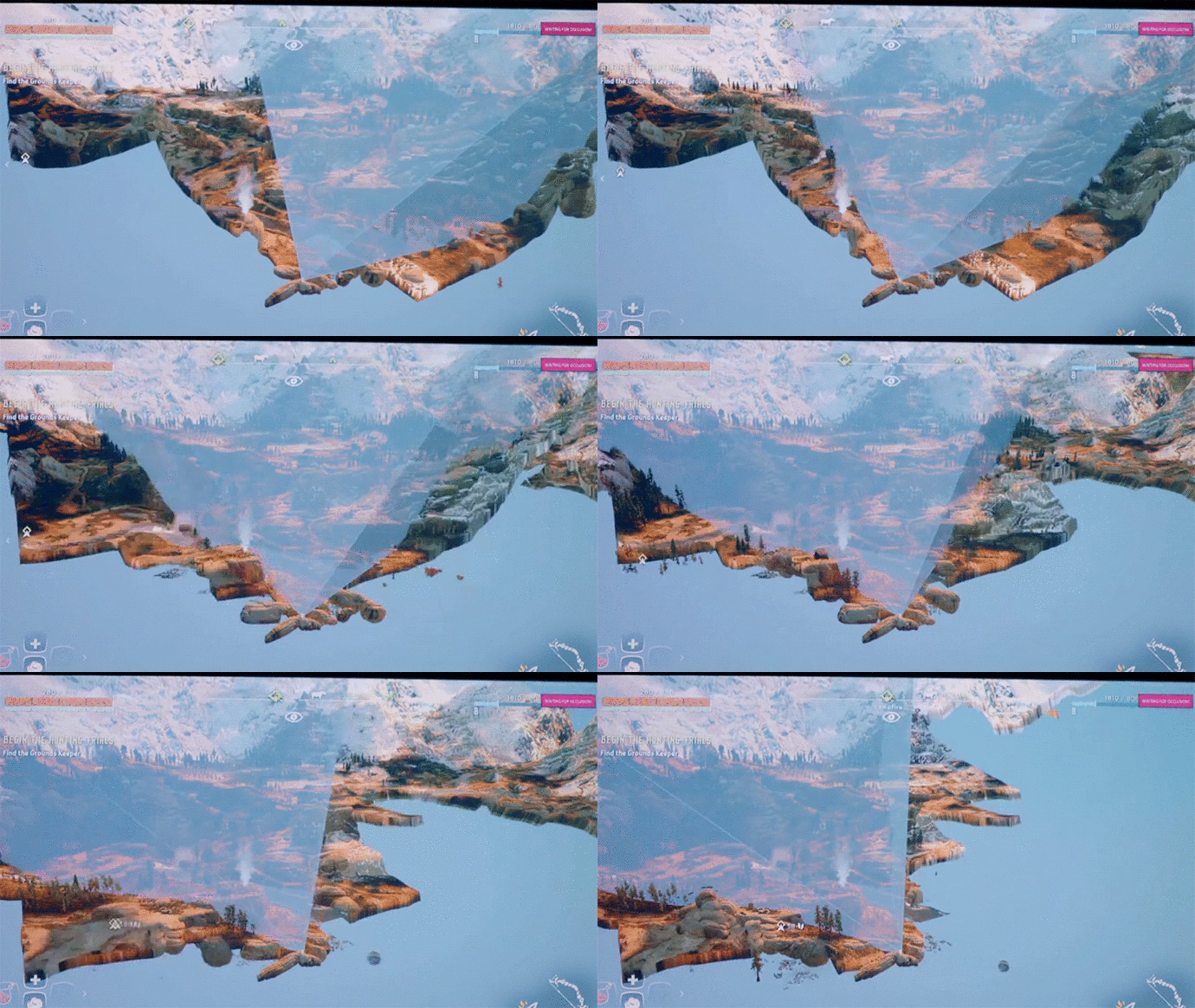
Here we have a visual representation on how this works insinde Horizon Zero Dawn.
In 2D:
In 2D frustum is a bit simpler since there is one less dimension the only calculations needed are to check if an object is inside our camera rectangle. But this doesn’t mean that it is easy to do this efficiently. In
A lot of times the problem is that this is done using “Brute Force”. Brute Force basically means that to know what objects should or shouldn’t be rendered every single one of them is looped and checked if it is inside the camera view. This is not very sustainable specially with games which manage a very big amount of entities or tiles. Brute Force can be used in cases where there are not that many entities.
So, we need some way to know what objects are on screen or at least close to it without looping them all. I will explain both of my solutions to this problem later.
2. Backface Cull:
This is a 3D exclusive culling which takes the polygons from single objects and calculates if they will be visible to the camera, and if they are not these won’t be rendered. Let’s say we are seeing a cube from the front, the only polygon which will be seen by the camera is a single face, so the backface cull will make sure the other squares are not drawn.
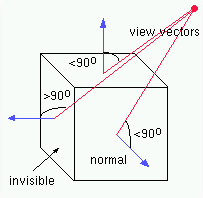
Image taken from Here, it’s also a great example on how this could be implemented.
3. Occlusion culling:
This type of culling makes sure that objects which are hidden/occluded behind other objects are not drawn.
There is an image taken from here shows a case in which occlusion can be very useful. The article is pretty interesting, it explains with more detail the occlusion process so I recommend checking it out.
In 3D
To be as efficient as possible we want to only draw the pixels which will be visible and not the ones occluded. Even the pixels from polygons intersecting between them.
Z-Buffering or depth buffering:
Z-buffering is the management of depth coordinates in 3D graphics rendering. It is used to solve the problem of visibility between objects which are aligned between them with the camera. Z-value refers to the measure of the perpendicular line between the 3D space coordinates of a pixel on the projection plane and the camera. Every single pixel in the screen has a Z-value and in each frame the objects which intersect with the pixel’s line are looped and the distance between that point of intersection and the camera is saved in the Z-buffer. Every object modifies the Z-value if it’s Z is lowest than the previous value so in the end only the closest object will be drawn.
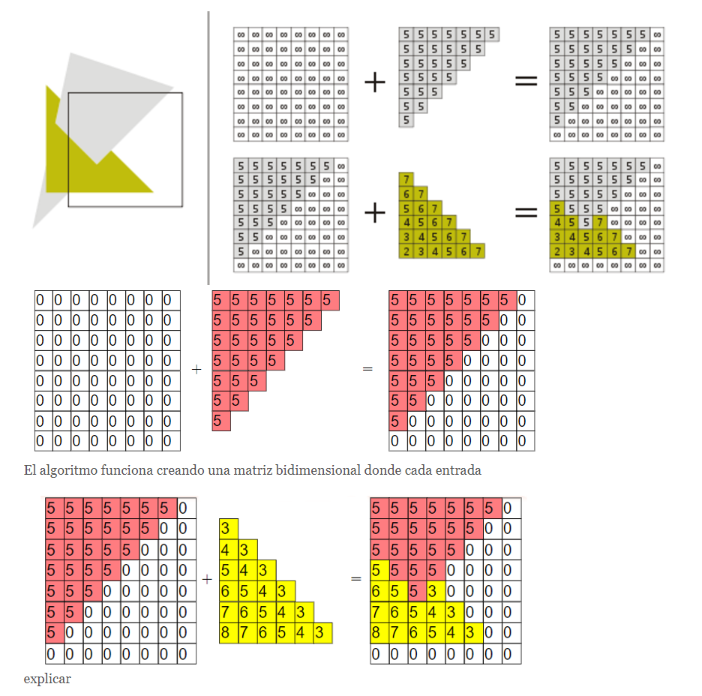
Image taken from here. Here is a very simple explanation on how it’s usually done. Also Here is another great tutorial.
In 2D
There is no popular solution to deal with occlusion culling in 2D that I know of, though I have seen some implementations around the internet, they vary a lot depending on the game. For example on our tiled game, we could use occlusion when we have a building, we will not need to draw the tiles it covers but this is hardly applicable to any other kind of game, so I encourage you to find in what ways you can optimize your 2D game with Occlusion culling!
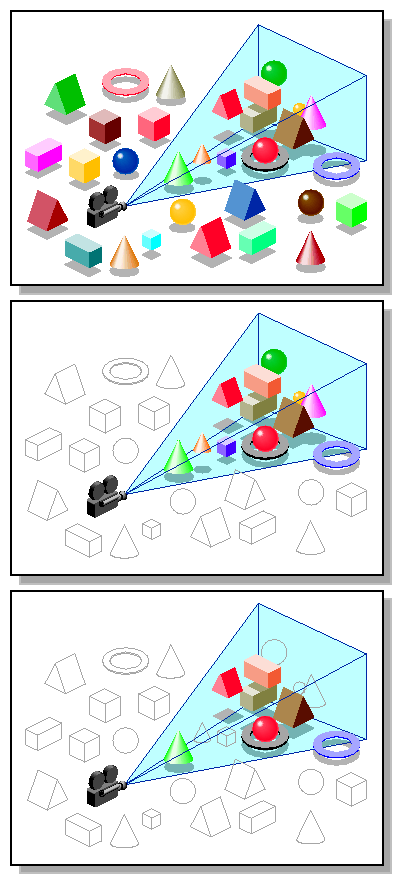
Final visual representation
This should help as a visual summary on how frustum and occlusion culling combined should look like in a 3D graphics game. I will also leave a link to the website this was found in which contains a lot of information on how to achieve faster rendering. It talks extensively about the points I brought up and even lower level graphics theory. High-Level Strategic Tools for Fast Rendering
Sprite ordering
Two dimensions:
Sprite rendering order is a necessary feature in a video game, without it the game would lack the feeling of depth and credibility from the player since in real life objects overlap each other all the time depending on their distance to the viewer.
In orthogonal view only two dimensions are represented. Some examples of this kind of view used in games would be side scrolling platformers or top down games. This means that the only depth that will be represented is between the objects which are further or closer to the camera in a fixed way. In this kind of view layers are used to define in which order sprites are drawn.
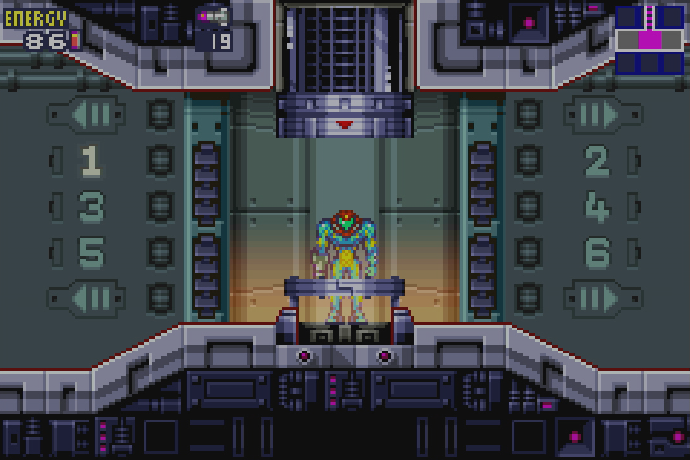
The background should always be drawn under the rest of the objects and the rest can be sorted in any way since they usually won’t collide, though this can change depending on the game, an usual order would be: background - platforms/floor - entities. As an example a platformer would have a leyer for: Platforms, player character, enemies and background.
Three dimensions
But in our case we have done the jump to what is usually called 2.5D or 3/4 which means that the elements are no longer in a fixed order and we can now “view” 3 dimensions. Though this third dimension is not really there because we are using 2D sprites we still have to create the illusion that it exists. This demands a way of dynamically change the order in which objects are drawn to remain consistent in showing depth when we have moving entities or creating new ones.

Objects which are further from the camera are the ones drawn first therefore will be overlapped by closer objects so we should order them using their Y position on screen from top to bottom. The position used to make this calculations should usually be their central position on the map. Now I would like to go through some implementations done by fellow developers and some of the problems and solutions they found.
Sprite Ordering methods found:
Sprite cutting and layers:
This methods consists on dividing the static sprites in two different parts, the lower or base which will be overlapped by the dynamic entities moving close to it and the top part which will overlap them.
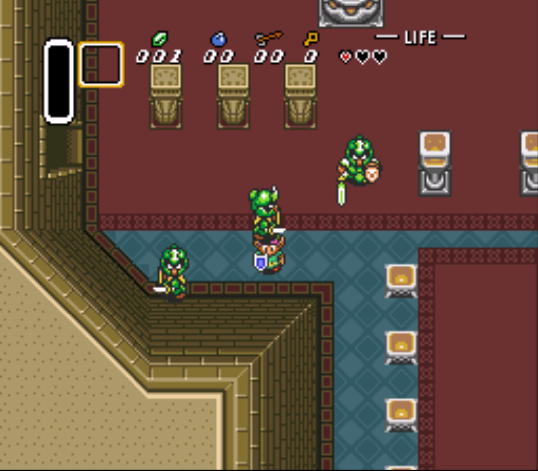
We can see this in action in “The Legend of Zelda: A link to the past” for the SNES with this tree here, though it is also used in other structures such as houses.
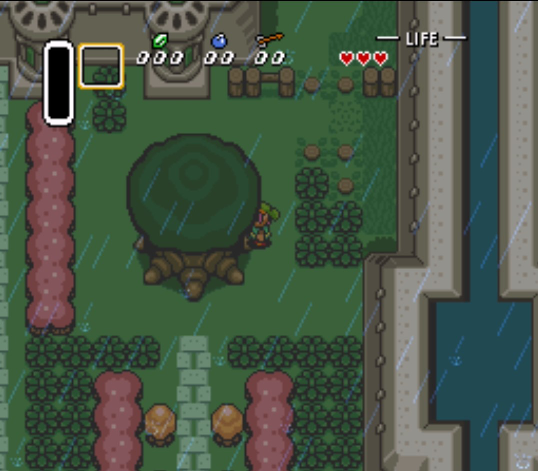
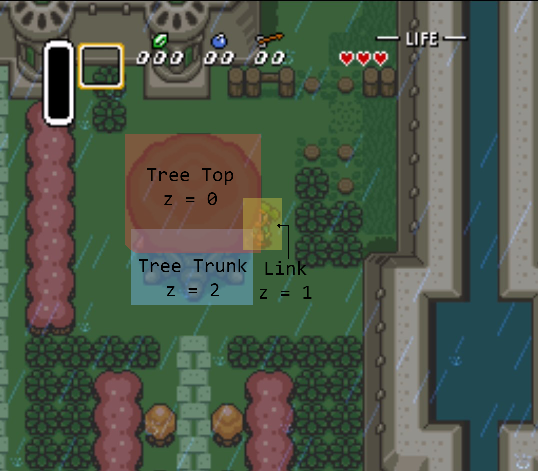
As I hope you can appreciate Link is under the Tree Top and at the same time over the Trunk of the tree so we can see that these are clearly two different sprites layered in a certain order. This next image portrays exactly how they are ordered.
Also in the following picture we can see how even the dynamic entities are not ordered. This is probably because they couldn’t afford to use so many resources on doing dynamic ordering. Here is an image to prove this.
Another example of this that I found in an isometric game is from the game Pocket City for Android and IOS. This is a very rudimentary approach which works in this game but is not really applicable to any isometric game. It also takes extra work to set up for every single different sprite in the game so it is not very sustainable. Here are some visuals to show how they did it.
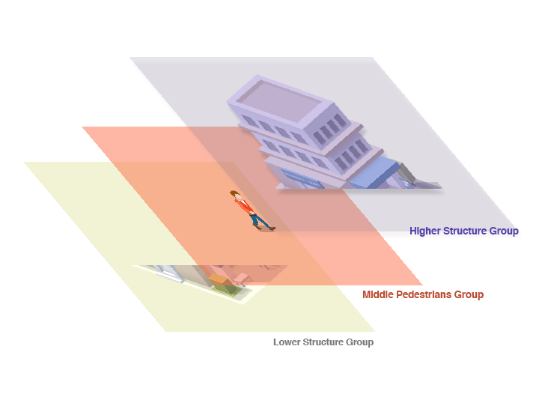
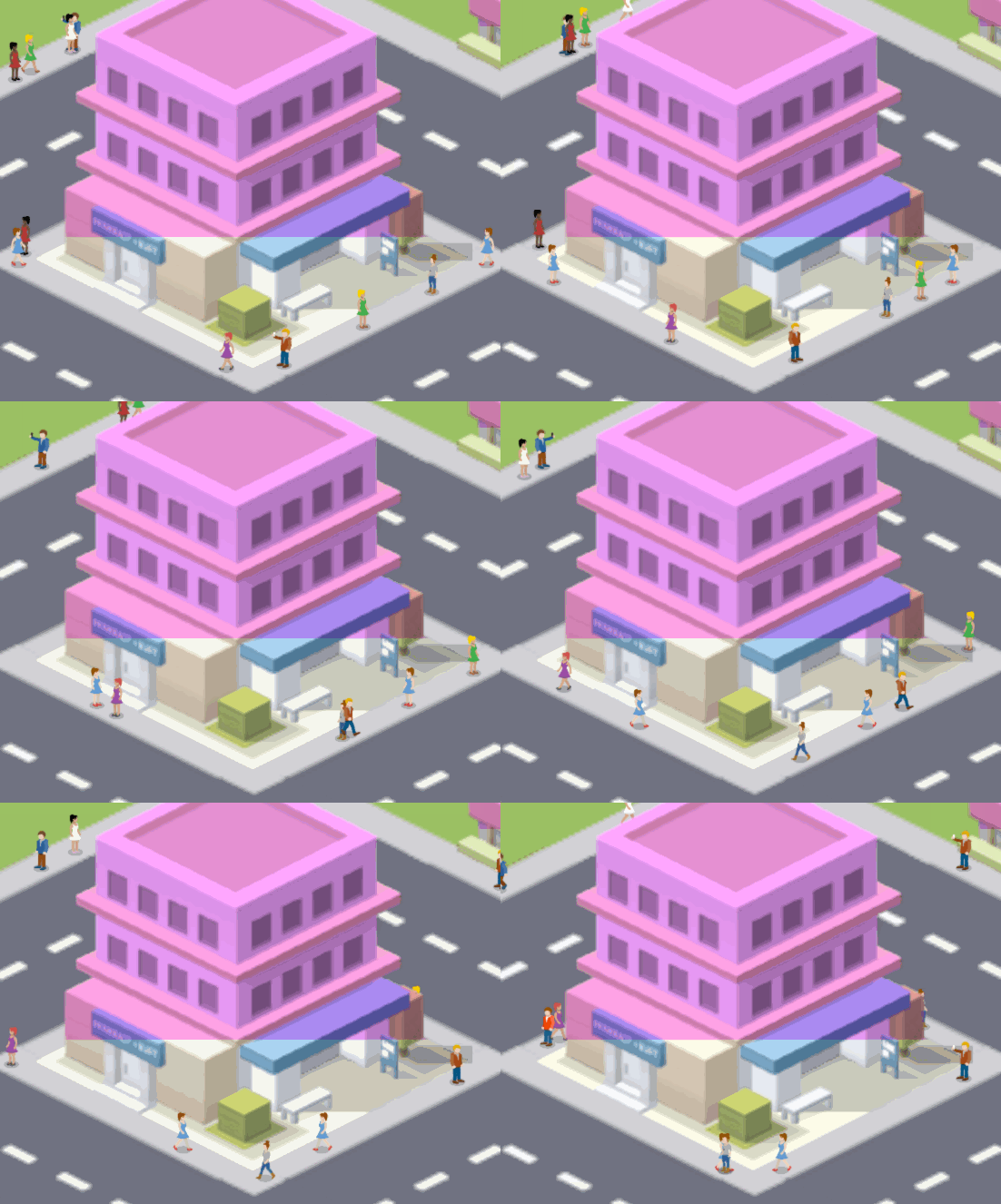
Dynamic ordering using Y position
This is the dsired method,and I would argue it is the most used in 2D non orthogonal views. All entities will havea point in the center of their base, and every frame they will be sorted from highest to lowest Y position so that they are drawn in the correct order.
I will explain how I implemented this later on.
My Implementation:
First problem we have to deal with is camera culling. To avoid using Brute Force I’m going tu use space partitioning. This is a technique which will dramatically help with being able to find objects which are in certain positions without having to loop through all of the Tiles or Entities. to do this I will introduce you to Quadtrees.
Quadtrees:
A Quadtree is a tree data structure with each node having 4 children. They are commonly used to partition space in a 2D space. These are commonly used in image processing, mesh generation, view frustum culling of terrain data and efficient collision detection amongst others.
Maybe you noticed that I just mentioned two very important things, view frustum culling and efficient collision detection. Collision detection is not part of this research but it’s a very important and significant optimization in every game which could use any kind of collision detection, maybe even for looking for targets to attack for an RTS game… Anyways I’ll leave a very good series of videos here which shows how to create a quadtree and then use it for optimizing collision detection.
But let’s get into the important use here, frustum culling. First I’d like to talk a bit more about how quadtrees work so that you can later try and implement this.
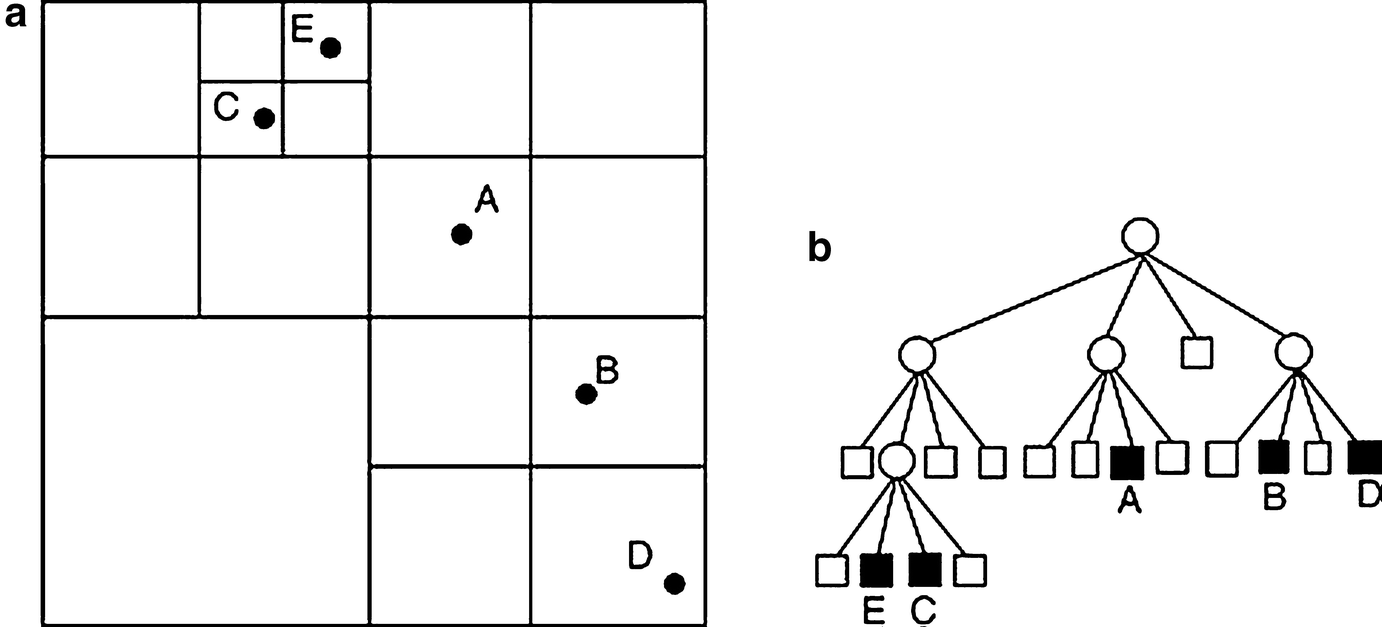
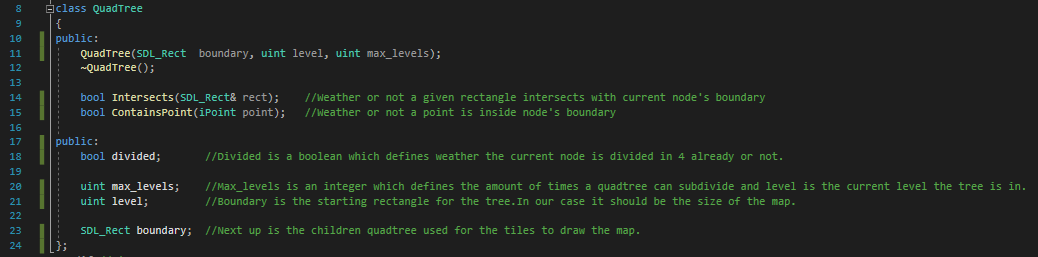
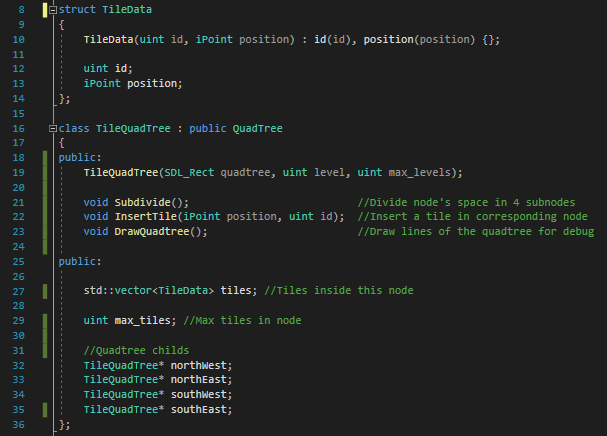
As any tree data structures quadtrees use recursion to be able to call their subsequent children. A space partitioning quadtree is created by inserting points or objects into it, first it will check if the object is inside the boundaries of the tree, if so, if the node is at its full capacity it will divide it into four and do the same process again for every one of the four new nodes. This will happen until the quadtree reaches the maximum levels which are defined when it’s created.
Here is the base Quadtree class I used:
And here the child class for the tiles:
Sprite Ordering:
The chosen approach for our game Project F will be ordering by Y position on screen. To do this we will need to sort all the entities we found inside our screen.
First we need to create the center point variable inside our Entity class, which will be different depending on the dimensions of our entities. If the entity is dynamic the position should be updated constantly.
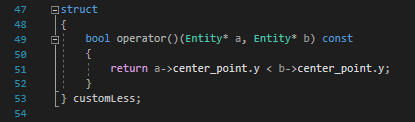
To sort the entities first we should get the ones that are actually on screen. For this I used brute force since we don’t have that many entities and we have to update them anyways. Once I have a list of entities in screen I use algorithm std::sort which allows me to create a condition to order my list.
Here is the sctruct created to sort the units as well as my sort function:

Links:
I’ll leave here all the links I used for my research as well other articles and websites which I thought had very good information if someone wants to really expand their knowladge in these subjects, hope they are useful to you!
Sprite ordering:
Sorting for isometric Moving platforms
Advcanced Isometric Sprite Sorting Tutorial
What I learned from trying to make an Isometric game in Unity
Culling:
Frustum:
View Frustum Culling Lighthouse3d
Math for Game Developers - Frustum Culling
Occlusion:
Gamasutra Occlusion Culling algorithm
Overview on popular occlusion culling techniques
Backface Cull:
Gamedev Graphics programming and theory
Culling General:
High-Level Strategic Tools for Fast Rendering